 PickGuide
TESmart HDC203-PM24 Review: Is Their Best-Seller Worth It?
TESmart's best-seller isn't a simple HDMI switch — it's the HDC203-PM24, a hybrid KVM docking station built for people who split their day between a MacBook and a desktop PC but only want one set of monitors. At $699 it's a serious desk investment, so we dug into how the triple-display trick actually works, what it costs to return or repair, and one real limitation TESmart itself discloses that's worth knowing before you buy.
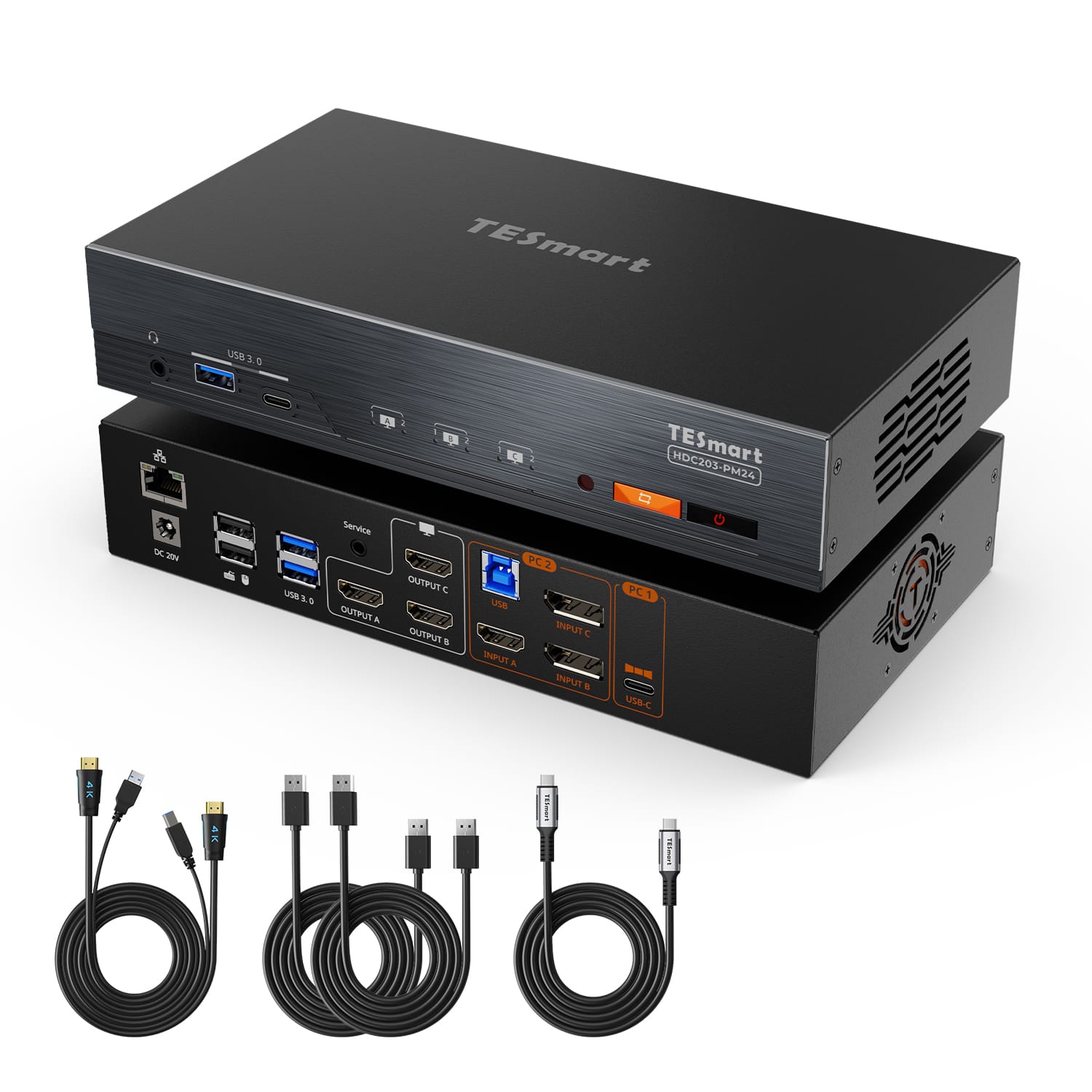
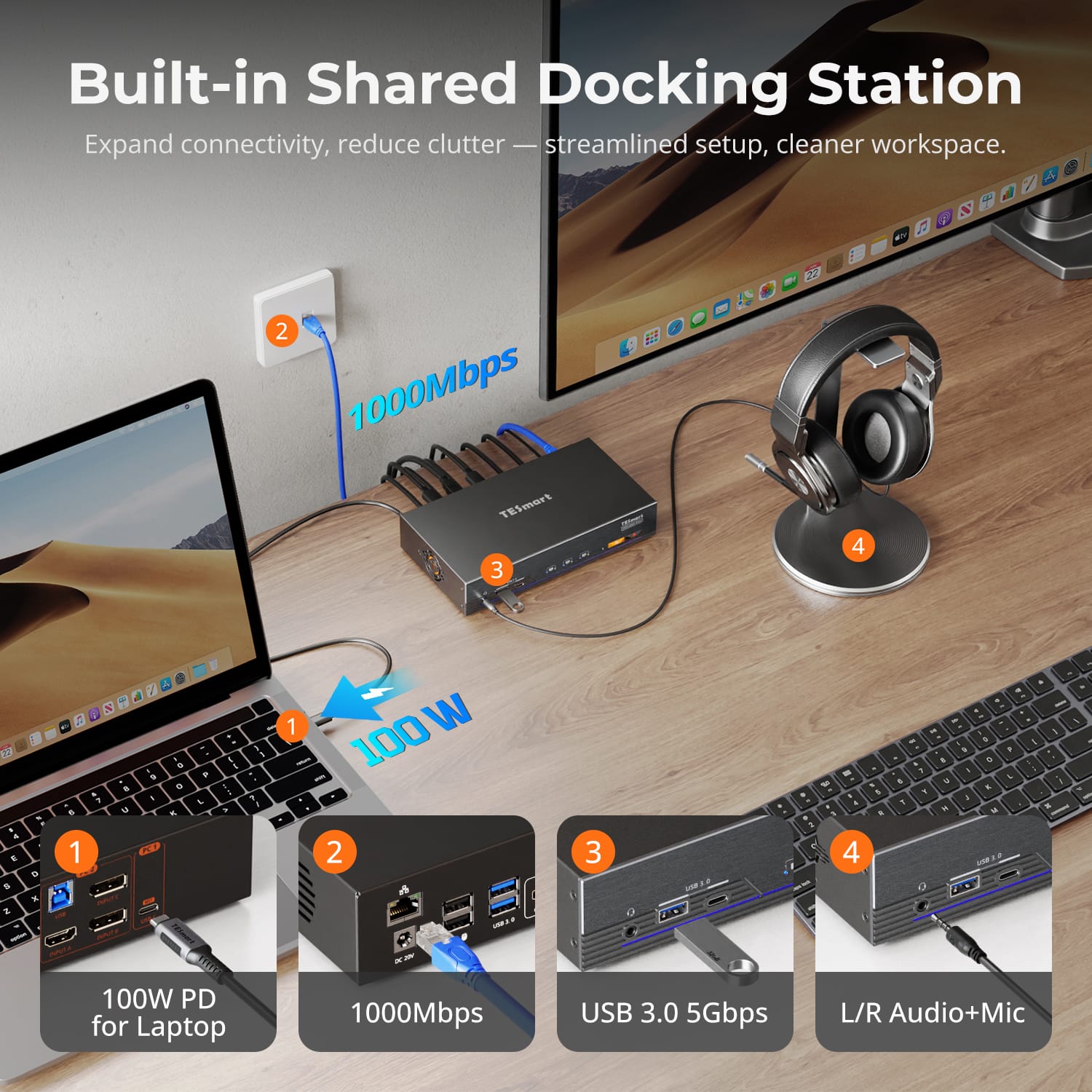
The HDC203-PM24 lets a MacBook (or any USB-C laptop) and a desktop PC share the same three monitors, keyboard, mouse, and audio, switching between them with a button press or hotkey. The desktop side connects natively over USB-B, HDMI, and two DisplayPort 1.2 ports — no special drivers needed. The laptop side is the clever part: a single USB-C cable carries one native DisplayPort video stream plus two additional video streams over DisplayLink software rendering, combining to drive three independent 4K60Hz monitors from a MacBook that would normally be limited by macOS's native multi-monitor restrictions, while simultaneously delivering 100W of power delivery to keep the laptop charged. It adds a Gigabit LAN passthrough, a USB 3.0 hub, and a headphone/mic jack shared between both machines. The catch, which TESmart discloses directly rather than burying: on macOS, HDCP-protected video from Netflix, Prime Video, and Disney+ will not display through the DisplayLink-driven outputs — the screen goes black on those specific apps due to how macOS handles the security handshake with DisplayLink, a known limitation of the technology rather than a defect in this unit. On-site, this exact model holds a perfect 5.0/5 from 8 reviews — a small but genuine sample for a fairly specialized, newer product. TESmart's own Trustpilot page for tesmart.com carries just a single review so far (4 out of 5 stars), too thin a sample to draw a real conclusion from, but we're showing it rather than omitting it since it's the only independent data point that exists for this specific storefront.
Pros
- Genuinely solves a real problem: true triple 4K60Hz output from a MacBook over one USB-C cable, working around macOS's native multi-monitor limits
- 100W USB-C power delivery keeps the laptop charged during use — no separate charger needed at the desk
- Desktop-side connection (HDMI + dual DisplayPort + USB-B) is fully native, no DisplayLink driver required on that machine
- Built-in Gigabit LAN passthrough and USB 3.0 hub reduce cable clutter
- Ships within 48 hours and free shipping to the contiguous US in 3-5 business days
Cons
- HDCP-protected streaming (Netflix, Prime Video, Disney+) goes black on macOS through the DisplayLink-driven outputs — a real, disclosed limitation of the underlying technology
- $699 is a significant investment for what is, at its core, a docking station and monitor switch
- Independent review data is extremely thin — only 1 Trustpilot review exists for tesmart.com so far
- Base warranty is 1 year; the full 5-year coverage requires registering the product separately
- Non-defect returns require the buyer to cover return shipping
Who It's For
Good For
- Hybrid workers who regularly switch between a MacBook and a desktop PC on the same three monitors
- Anyone who wants laptop charging, LAN, and USB peripherals consolidated into a single dock-and-switch cable
- Buyers who don't rely on watching DRM-protected streaming video through the Mac side of the dock
Skip If
- You need to stream Netflix, Prime Video, or Disney+ through this dock on a Mac — it won't display on the DisplayLink outputs
- You only use one computer at your desk — a simpler, cheaper dock or monitor hub will do
- You want a large body of independent reviews before a $699 purchase
Verified Ratings
Key Specs
| Display output | Triple 4K60Hz (3x HDMI out) |
| Laptop/Mac connection (PC1) | Single USB-C, 100W PD, DisplayLink driver required |
| Desktop connection (PC2) | USB-B + HDMI + 2x DisplayPort 1.2, native (no driver needed) |
| USB hub | 2x USB 3.0 + 2x USB 2.0 rear, USB-A + USB-C front |
| Networking | Gigabit LAN passthrough |
| OS support | Windows 10/11; macOS Ventura 13-Tahoe 26; Android 5.0+; ChromeOS R51+; Linux Ubuntu 20.04-24.04 |
| Switching | Front-panel buttons (A/B/C) or hotkey (Right-Ctrl ×2 + arrow key) |
| Warranty | 1 year standard; extendable to 5 years total via free product registration |
| Returns | 30 days; buyer pays return shipping unless the item is defective |
| Shipping | Ships within 48 hours; free to contiguous US in 3-5 business days |
Frequently Asked Questions
Can I watch Netflix or other streaming services through this dock on a Mac?
Not fully. TESmart discloses that on macOS, HDCP-protected video from services like Netflix, Prime Video, and Disney+ will show a black screen through the DisplayLink-driven outputs, because macOS can't complete the required security handshake while the DisplayLink driver is active. This is a limitation of the macOS+DisplayLink combination generally, not a defect specific to this unit.
Does the desktop PC also need to install the DisplayLink driver?
No. Per TESmart's own FAQ, only the laptop (PC1, connected via the single USB-C port) needs the DisplayLink driver installed. The desktop PC (PC2) connects natively through HDMI, DisplayPort, and USB-B, so no extra driver is required on that machine.
Verdict
The HDC203-PM24 does something genuinely hard well: it gets a MacBook past macOS's native multi-monitor ceiling to drive three real 4K60Hz displays through a single cable, while also charging the laptop and sharing everything with a desktop PC. That's a legitimately narrow, well-executed niche. The $699 price and thin independent review base are real considerations, and the HDCP streaming limitation on macOS is worth confirming isn't a dealbreaker for your workflow before ordering. If your setup matches what this is built for, it's a well-thought-out solution; if you just need a basic dual-input monitor switch, it's more dock than you need.